
Tutor.com
In SE’s Canvas, students can access a portal to 24/7 experts on various academic fields via Tutor.com. Connect with an expert online tutor now for 24/7 help with Math, Science, English, Social Studies, or Business courses.
NOTE: You must access this resource from within SE’s Canvas to have free access to this resource. If you go through an external way, you will be asked to pay.
To access Tutor.com for free as a Southeastern student:
- Log on to your Canvas
- Select any of your courses
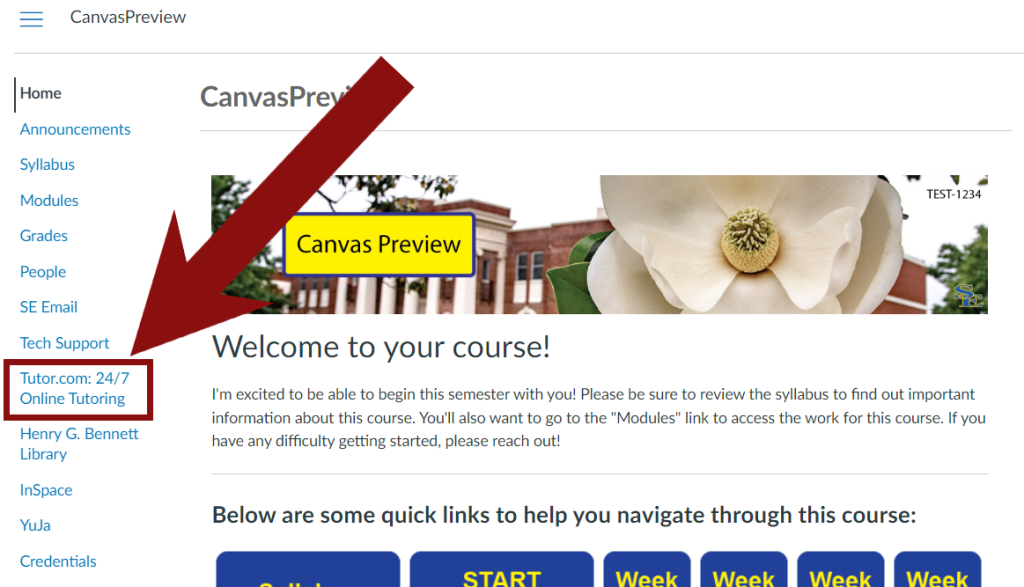
- Look at the course menu and select the “Tutor.com” link in there
- If you do not see the menu in your course, it may be collapsed. Click the three horizontal lines at the top-left to expand it back out (watch this video for context).
- If you do not see the menu in your course, it may be collapsed. Click the three horizontal lines at the top-left to expand it back out (watch this video for context).
If you have any questions or run into issues, please reach out to CIDT@se.edu for assistance.